FtSwarmStepperMotor
The ftSwarmStepperMotor can only be used in conjunction with an ftSwarmPwrDrive.
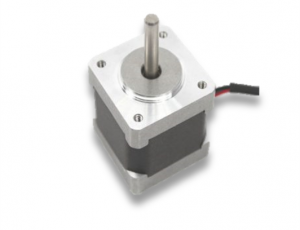 Stepper Motor
When controlling stepper motors, the target position is specified to the controller via the number of steps to be traveled. The controller “moves” the set number of steps at a specified speed. Unlike standard fischertechnik motors, the speed is specified in steps per second.
Several steps are required to start a stepper motor:
- Set the step speed using setSpeed.
- Specify the target number of steps to be traveled using setDistance.
- Start the motor using run.
- Once the target position is reached, the motor stops automatically.
The stepper motor counts the steps it has traveled. To ensure the model knows its absolute position, a reference position must first be reached after the controller starts up. The ftSwarmPwrDrive controller uses the combined reference/limit switch inputs ES1 through ES4 for this purpose.
- Set the step speed using setSpeed.
- Use homing to start moving toward the reference position. The specified distance determines the direction of travel based on its sign; if no reference position is found within the specified distance, the process aborts. If the reference point is detected, the motor moves back a few steps—thus deactivating the limit switch input again. The distance can be set in advance using setHomingOffset.
Use reed switches for precise reference positions. Fischertechnik push buttons exhibit significant bounce, so the reference position can only be measured imprecisely. If you only want to use the inputs as limit switches, standard push buttons are perfectly sufficient.
The homing process establishes an absolute coordinate system. The corresponding motor is then at its 0 position. Movement commands via setDistance can refer to both the absolute position in the coordinate system and relative positions. With each movement, the position in the coordinate system is “incremented.”
- You can use setPosition to set the current position in the coordinate system.
- getPosition returns the current position in the coordinate system.
Stepper motors do not play a major role in fischertechnik. To date, they have only been used in two kits—the Computing Plotter+Scanner (30571) and the 3D Printer (533624). They were controlled via the Computing Interface—which is practically obsolete today—or the 3D Printer control unit. The stepper motors used in these kits are not compatible with the ftSwarmPwrDrive.
FtSwarmStepperMotor(FtSwarmSerialNumber_t serialNumber, FtSwarmPort_t port)
Constructor to create a FtSwarmStepperMotor object. If the referenced controller isn’t connected to the swarm yet, the firmware will waits until the controller gets online.
- serialNumber: Serial number of the used ftSwarm controller.
- port: Port number, FTSWARM_SETP1 to FTSWARM_STEP4
FtSwarmStepperMotor( const char *name )
Constructor to create a FtSwarmStepperMotor object. If the referenced controller isn’t connected to the swarm yet, the firmware will waits until the controller gets online.
- name: Aliasname des IO-Ports.
void setSpeed( int16_t speed )
Sets the motor speed.
- speed: Speed in the range of -4096 to 4096 steps per second.
uint16_t getSpeed()
Returns the motor speed.
void setDistance( int32_t distance, bool relative )
Sets the distance to be traveled. However, the motor is not started until the run command is executed.
- distance: Number of steps
- relative: If relative is true, the distance is traveled relative to the current position. If the value is false, the motor moves to the absolute position specified by distance.
int32_t getDistance( void )
Returns the number of steps remaining.
void run( void )
Start the motor.
bool isRunning( void )
True, if the motor is “running”.
void stop( void )
Stops the motor immediately.
void setPosition( int32_t position )
This command sets the position in the coordinate system. The homing command moves the motor to a reference position. Its position in the coordinate system is 0 after the homing command.
If the motor is moved 5,000 steps using setDistance(5000, true) followed by run(), its absolute position is then 5,000. Another setDistance(-500, true) moves the motor 500 steps in the opposite direction, and the absolute position is now 4,500.
The setPosition command can be used to set the position in the absolute coordinate system. If the axis has a travel range of 10,000 steps and the zero position is to be set at the center of the travel range, there are two options:
- setHomingOffset(5000) followed by homing(-10000) first moves to the reference position and then 5,000 steps to the center of the travel range. The absolute position of the motor is 0.
- homing(-10000) moves to the reference position. setPosition(-5000) then correctly defines the absolute coordinate system—the center of the travel range is 0. However, the motor remains at the reference position and does not move to the center position.
int32_t getPosition( void )
Returns the motor’s position in the absolute coordinate system.
void homing( int32_t maxDistance )
Starts the homing process. During this process, the motor moves a maximum of maxDistance steps. The sign of maxDistance determines the direction of rotation of the motor during the homing process.
bool isHoming( void )
True, when the homing process is running.
void setHomingOffset( int32_t offset )
Sets the offset by which the motor is moved in the opposite direction after the reference switch is triggered.
void setMotionType( FtSwarmMotion_t motionType )
This function sets the motor driver’s operating mode:
- FTSWARM_COAST the motor is stopped but can be adjusted manually.
- FTSWARM_BRAKE the motor is stopped but actively braked. The motor cannot be adjusted manually.
- FTSWARM_ON switches the power stage on again at the original speed.
FtSwarmMotion_t getMotionType()
Returns the motor’s motion type;
void coast( void )
Set the motor’s motion type to FTSWARM_COAST.
void brake( void )
Set the motor’s motion type to FTSWARM_BRAKE.