Alias Names
Up to now, the IO’s were identified by the serial number and the name of the port. This is nice in a small setup, but it could be confusing in a bigger robot. It would be much easier to identify the IO based on it’s function:
  SwitchWithSN     = new FtSwarmSwitch( 4711, FTSWARM_A1 );  // Old style: with serial number and port
  SwitchWithAlias  = new FtSwarmSwitch( "MotorEndStop" );    // New style: call my alias name!
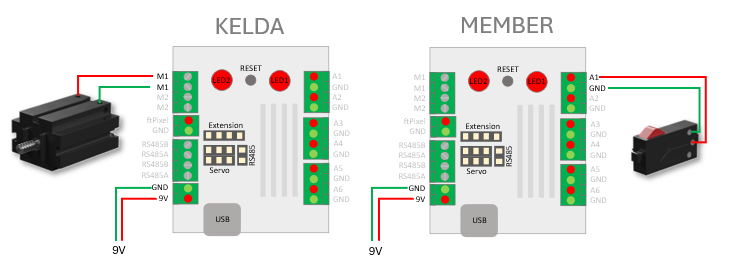
First, you need to set the alias names for switch and motor. Therefore you need to upload the standard firmware. Start a serial console and enter the firmware menu by using setup. Use “(i) IO-Configuration” in main menu:
***** IO-Configuration *****

     Name               Type            Events Alias
( 1) A1                 DigitalInput    0
( 2) A2                 DigitalInput    0
( 3) A3                 DigitalInput    0
( 4) A4                 DigitalInput    0
( 5) A5                 DigitalInput    0
( 6) A6                 DigitalInput    0
( 8) PWRCTL             Powersensor     0
( 9) ftSwarm1011.A1     DigitalInput    0
(10) ftSwarm1011.A2     DigitalInput    0
(11) ftSwarm1011.A3     DigitalInput    0
(12) ftSwarm1011.A4     DigitalInput    0
(13) ftSwarm1011.A5     DigitalInput    0
(14) ftSwarm1011.A6     DigitalInput    0
(15) ftSwarm1011.PWRCTL Powersensor     0

(a)  show actors
(p)  show pixels

(x)  Exit

IO configuration>
On the second controller, the name switch must be set for A1. Therefore, select “( 9) ftSwarm1011.A1” to configure the port.
***** A1 *****

     name:       A1
(t)  IO type:    DigitalInput
(a)  alias

(+)  add event
(s)  switch configuration

(x)  Exit

IO configuration/A1>
Select “(”a) Alias” and assign the alias name switch. Use (x) Exit to return to the IO Configuration menu.
On the first controller, motor M2 must now be assigned the alias name motor. Use “(a) show actors” to switch the display from sensors to actuators:
***** IO configuration *****

     Name               Type            Events Alias
( 1) M1                 Motor           0
( 2) M2                 Motor           0
( 3) SERVO1             Servo           0
( 4) SERVO2             Servo           0
( 5) ftSwarm1011.M1     Motor           0
( 6) ftSwarm1011.M2     Motor           0
( 7) ftSwarm1011.SERVO1 Servo           0
( 8) ftSwarm1011.SERVO2 Servo           0

(i)  show inputs
(p)  show pixels

(x)  Exit

IO configuration>
Use “( 1) M1” to select the motor and assign the alias name motor. Exit the port and IO configuration by pressing (x) Exit twice. When exiting the I/O configuration, confirm “Save changes? (Y/N)?” with “Y.”
#include <ftSwarm.h>

FtSwarmSwitch *sw;
FtSwarmSMotor *mot;

void setup( ) {

  // start the swarm
  FtSwarmSerialNumber_t local = ftSwarm.begin( );

  // get switch and motor instances
  sw  = new FtSwarmSwitch( "switch" );
  mot = new FtSwarmSMotor( "motor" );

}

void loop( ) {

  // check if switch is pressed or released
  if ( sw->isPressed() )
    mot->setSpeed(100);
  else
    mot->setSpeed(0);

  // wait some time
  delay(100);

}
Let’s look at the monitor page of your swarm. The IO’s show their alias names as well.
Finally, modify your hardware setup. Move your motor to port M2 of your first device. Set the alias motor at your first device. Start the application again. It’s working without any changes!
But keep in mind, an alias name needs to be unique in your swarm! In this example it doesn’t matter to define motor twice. The firmware always checks the local device alias names first. But using multiple remote devices, the result depends on the boot sequence of the remote devices.