My First Application
The first application is not about writing “Hello World” on a display. It’s just to control a motor with a simple switch. Therefore you need a ftSwarmRS, a switch, a motor or lamp and a 9V power supply.
The hardware setup is easy:
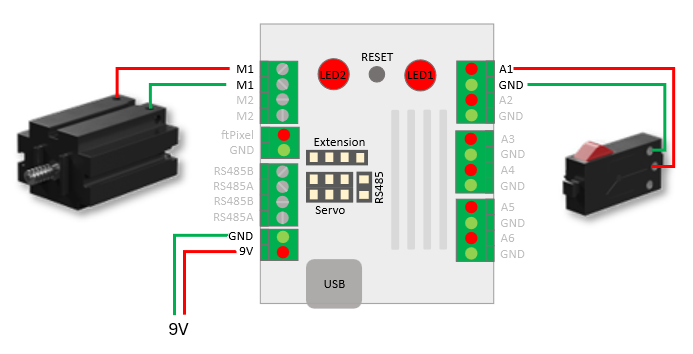
Copy the following code and upload it to your device. Whenever you press your switch, the motor starts running. If you release the switch, the motor stops.
#include <ftSwarm.h>

FtSwarmSwitch *sw;
FtSwarmSMotor *mot;

void setup( ) {

  // start the swarm
  FtSwarmSerialNumber_t local = ftSwarm.begin( );

  // get switch and motor instances
  sw  = new FtSwarmSwitch( local, FTSWARM_A1 );
  mot = new FtSwarmSMotor( local, FTSWARM_M1 );

}

void loop( ) {

  // check if switch is pressed or released
  if ( sw->isPressed() )
    mot->setSpeed(100);
  else
    mot->setSpeed(0);

  // wait some time
  delay(100);

}
The Sketch is quite easy to understand.
Like all Arduino-sketches, it uses the main functions setup and loop.
- When the sketch starts,
setupis called automatically. In standard you initialize your hardware in this function. - Afterwards
loopstarts. If the function stops, the sketch calls it again and again.loopis used to control you model.
#include "ftSwarm.h" loads the ftSwarm-Library.
Next, the IOs switch and motor are defined.
In setup, the swarm is first initialized:
// start the swarm
FtSwarmSerialNumber local = ftSwarm.begin( );
The result is the serial number of your local controller. With this serial number, you could now instantiate switch and motor:
sw  = new FtSwarmSwitch( local, FTSWARM_A1 );
mot = new FtSwarmMiniMotor( local, FTSWARM_M1 );
The swarm must always be initialized first using ftSwarm.begin();. To define IOs globally, they must therefore be implemented as pointers. So they could be initialized after starting the swarm.
The main loop is just about querying the switch state and starting/stopping the motor:
if ( sw->isPressed() )
  mot->setSpeed(100);
else
  mot->setSpeed(0);
Choosing the right motor type is important. Each fischertechnik motor has its own characteristic curve and requires a different voltage to start. These characteristic curves are stored in the firmware, so that the motor without any mechanical load will rotate even with mot->setSpeed(1).
In our example, the motor type has no effect, since the motor is either running at full speed or is turned off.
Motor speed is specified as a percentage — at a value of -100, the motor rotates at full speed in one direction; at 100, it rotates in the other direction. Stepper motors differ from this and operate within a range of -4096 to 4096.