wifi Settings
In this menu, you configure the controller’s wifi settings.
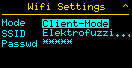
If you make changes to the wifi settings, they must be saved and the controller must be restarted.
wifi Mode
Here you configure whether the controller uses an existing wifi network or provides its own wifi network for the other controllers in the swarm.
- CLIENT MODE uses an existing wifi network. In most cases, this is the network from your internet router.
- AP MODE does not require a router; the ftSwarm controller creates its own wifi network.
- OFF turns wifi off and significantly reduces power consumption.
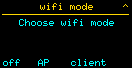
If a wifi network is already available, you should definitely use it. Please note that ESP32 processors support only the 2.4 GHz band.
If your wifi uses multiple repeaters or access points, each access point broadcasts the SSID on a different channel. This can cause communication problems in the swarm if controllers connect to different access points. One solution is to provide a dedicated SSID for your swarm using only one access point. If that is not possible, use AP mode.
AP mode is enabled on only one controller. It then acts as an access point and all other controllers in the swarm operate in client mode. Please note that in this case only a maximum of 10 devices can be on the wifi network.
SSID
If you open this menu item in CLIENT wifi mode, the controller scans for suitable wifi networks in the area, so you only need to select the desired network.
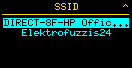
If you selected AP mode, enter the SSID here using the on-screen keyboard.
When scanning wifi networks in your area, the controller shows only networks from the 2.4 GHz band with good signal strength.
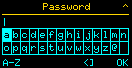
Password
Enter your wifi password here. If the controller is in AP mode, starting with firmware version 0.7.0 you must set a password with at least 8 characters.